
Panda widgets for iPhone, Android and Apple Watch
Your next dose, water and protein on your home screen and Lock Screen. Log a dose or add water in one tap, and let Panda count down to dose day for you.
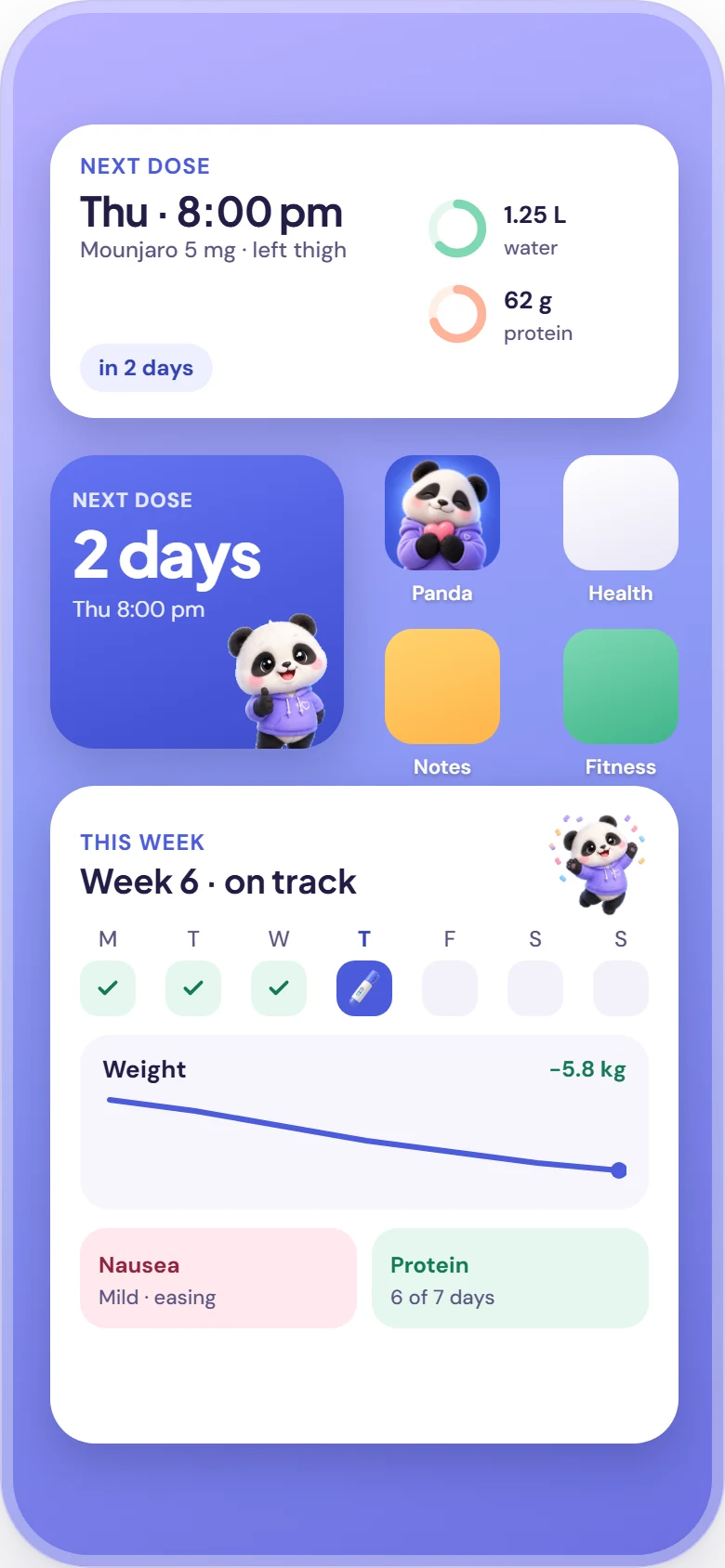

Panda has home-screen widgets on iPhone (small, medium, large) and Android (4×2 Today, 2×2 next dose, 2×2 streak, 4×1 Ask Panda), Lock Screen widgets and a dose-day Live Activity with Dynamic Island on iPhone, and Apple Watch complications. Widgets update every time you log, and you can add water from a widget without opening the app.
Pick the size that fits your day
Widgets update every time you log, and the water buttons add a glass without opening the app.
iPhone
iOS 16.1+ · WidgetKit Small Home screen
Countdown to your next dose. Tap it to open the log-dose screen.
- Medium Home screen
Next dose with water and protein rings. Tap +250 ml to add water without opening the app (iOS 17+).
 Large Home screen
Your day at a glance: next dose, water and protein, weight change, last side effect and your streak.
 Lock Screen Lock Screen
A circular dose countdown, a circular water ring, a rectangular next-dose card and an inline “dose in 2 days”.
 Live Activity Lock Screen & Dynamic Island
Starts on dose day with a countdown and a Log button, then shows “Logged” once you’ve taken it.
Android
Android 8+ · Material You Today · 4×2 Home screen
Water, protein and weight with Log dose, + Water and Weight buttons. Resize it to 4×3.
- Next dose · 2×2 Home screen
Countdown to your next dose and the time it’s due.
 Streak · 2×2 Home screen
How many weeks in a row you’ve logged every dose.
 Ask Panda · 4×1 Home screen
A search-style bar that opens Ask Panda in one tap.
Apple Watch
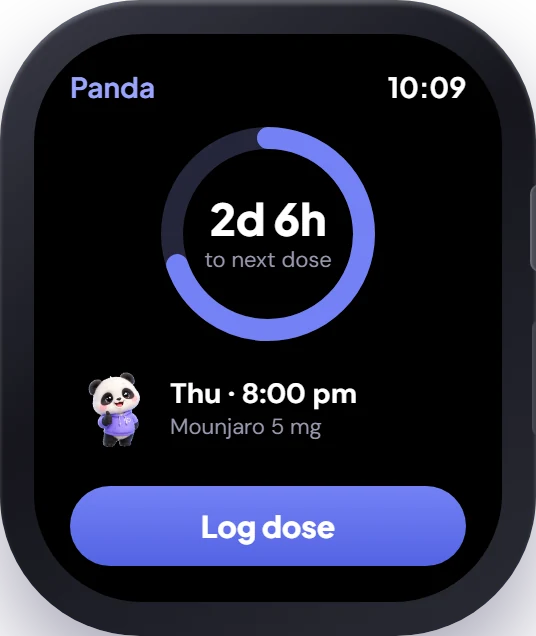
watchOS 10+- Next dose Circular · corner · rectangular · inline
A countdown to your next dose on any watch face.
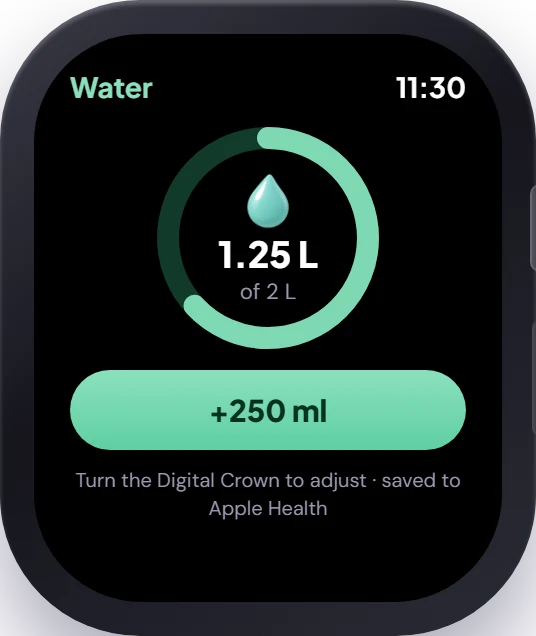
- Water Circular
Today’s water ring. Add 250 ml from the watch app.
 Protein Circular
Progress towards your daily protein target.
 Smart Stack watchOS 10+
Panda rises to the top of the Smart Stack on dose day.
A countdown on your Lock Screen
On dose day, Panda starts a Live Activity on your iPhone Lock Screen and in the Dynamic Island. It counts down to your dose time and has a Log button; once you log, it shows “Logged” and quietly goes away.
- Lock Screen and Dynamic Island
- Log button right on the card
- Ends when you log, so it never lingers
Complications for every watch face
Add your next dose, water or protein to your watch face. On dose day, Panda moves to the top of the Smart Stack, and the dose reminder on your wrist has a Log now button.
- Circular, corner, rectangular and inline complications
- Log a dose and pick the site from your wrist
- Add water with the Digital Crown
Set it up in under a minute
On iPhone
- Touch and hold an empty spot on your Home Screen until the apps jiggle.
- Tap the + button in the corner and search for Panda.
- Choose small, medium or large and tap Add Widget.
- For the Lock Screen: touch and hold it, tap Customise, then add Panda below the clock.
On Android
- Touch and hold an empty spot on your home screen.
- Tap Widgets and scroll to Panda.
- Drag Today, Next dose, Streak or Ask Panda onto your screen.
- Resize Today from 4×2 to 4×3 for bigger buttons.
Reminders that help, never nag
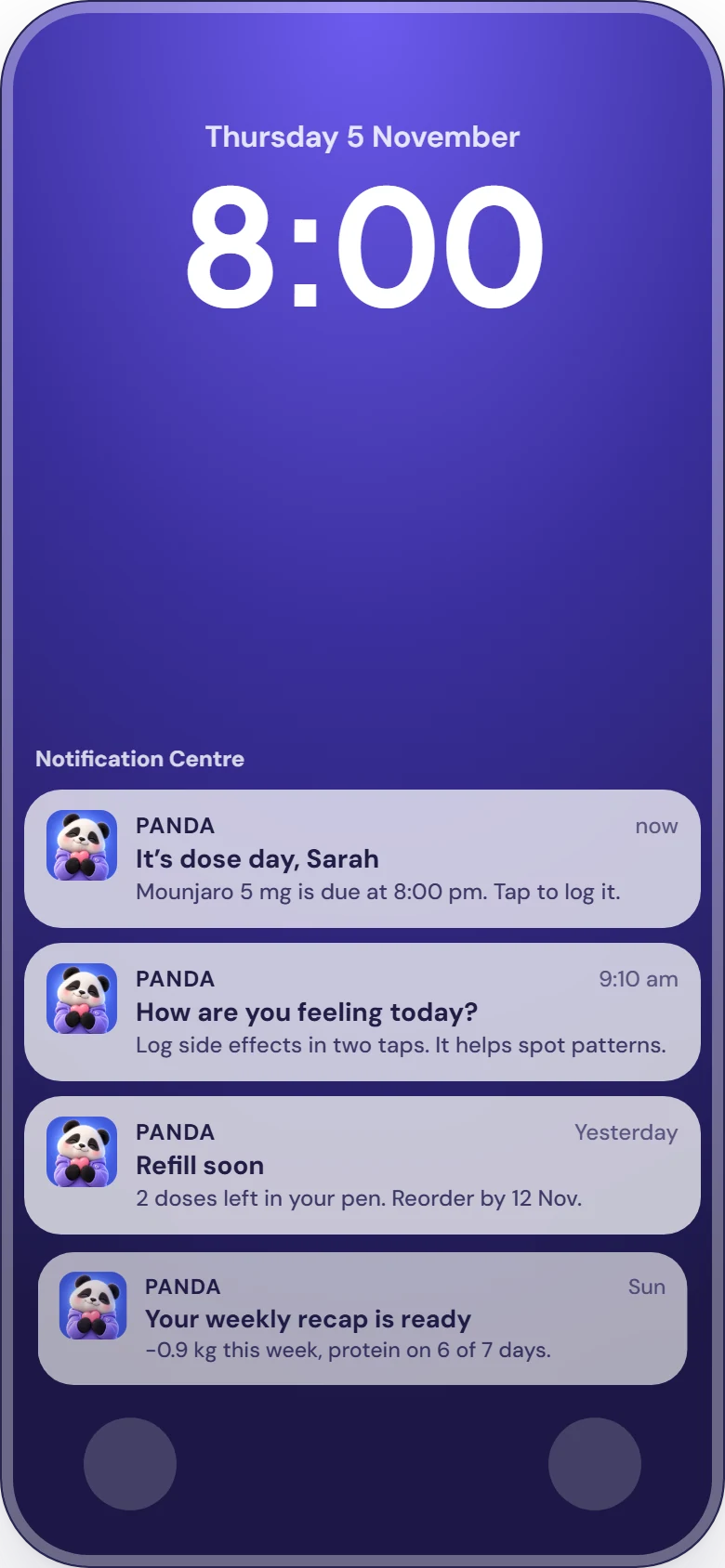
Panda sends dose-day reminders at the time you choose (with Log now and Remind me in 1 h actions), a second reminder 2 hours later if you haven’t logged, refill alerts, a morning side-effect check-in after each dose, optional water and protein nudges (up to 3 a day) and a weekly recap on Sundays at 6 pm. Quiet hours keep nudges out of your evenings, and every type can be turned off.

Dose day
At the time you chooseIt’s dose day, Sarah · Mounjaro 5 mg is due at 8:00 pm. Tap to log it.
Log now or Remind me in 1 h, right from the notification or your Apple Watch.
Remind me again
2 hours later, if you haven’t loggedDid you take your Mounjaro? Log it in one tap so your history stays complete.
Refill alert
When a pen, vial or pack runs lowRefill soon · 2 doses left in your pen. Prescriptions can take 3–5 working days.
Side-effect check-in
The morning after a doseHow are you feeling today? Log side effects in two taps. It helps spot patterns.
Water & protein nudges
Optional · up to 3 a daySip break · A glass of water now helps with nausea and constipation.
Weekly recap
Sundays at 6 pmYour weekly recap is ready · See your week: doses, protein and how you felt.
Widget questions, answered
Does Panda have widgets?
Panda has home-screen widgets on iPhone (small, medium, large) and Android (4×2 Today, 2×2 next dose, 2×2 streak, 4×1 Ask Panda), Lock Screen widgets and a dose-day Live Activity with Dynamic Island on iPhone, and Apple Watch complications. Widgets update every time you log, and you can add water from a widget without opening the app.
How do I add the Panda widget on iPhone?
Touch and hold an empty spot on your Home Screen until the apps jiggle, tap the + button, search for Panda, pick a size (small, medium or large) and tap Add Widget. For the Lock Screen, touch and hold the Lock Screen, tap Customise, then Lock Screen, and add a Panda widget below the clock.
How do I add the Panda widget on Android?
Touch and hold an empty spot on your home screen, tap Widgets, scroll to Panda and drag the Today, Next dose, Streak or Ask Panda widget onto your screen. The Today widget can be resized from 4×2 to 4×3.
What is the Panda Live Activity?
On dose day, Panda shows a Live Activity on your iPhone Lock Screen and in the Dynamic Island with a countdown to your dose and a Log button. Once you log, it shows “Logged” and then disappears.
What notifications does Panda send?
Panda sends dose-day reminders at the time you choose (with Log now and Remind me in 1 h actions), a second reminder 2 hours later if you haven’t logged, refill alerts, a morning side-effect check-in after each dose, optional water and protein nudges (up to 3 a day) and a weekly recap on Sundays at 6 pm. Quiet hours keep nudges out of your evenings, and every type can be turned off.
Are my medication details visible on the Lock Screen?
Medication names and weight in Panda widgets are marked as private, so iPhone hides them on the Lock Screen while your phone is locked. You can turn off any notification type in Reminders & alerts.
Start your 3-day free trial
Download Panda, choose the Yearly plan and try everything free for 3 days. Cancel any time in your App Store or Google Play settings.